
I had no idea what a project management platform was until a couple years ago in my first management role. All of a sudden, I was the given the task of organizing all digital communications for an app that had over 50 different products. We sent out multiple email marketing campaigns, push notifications, digital banners, in-app pop-ups each day and it was my job to keep track of all digital communications and divide up the work between my team to make sure we met all our deadlines. I became the Monday.com representative at my company even though I had never used the project management application before. This forced me to become an expert at project management using Monday.com. I grew to love the platform and the multitudes of organizational tools it offers…although it is far from perfect.
Monday.com is a project management platform similar to Asana that allows users to create boards (or a glorified excel sheet) to organize tasks and projects for many different team members with many different organizational tools. For example, you can assign team members to tasks, create due dates, keep track of the status of tasks and projects, create formulas to keep track of budgets, attach files, create personalized views, and more.
The feature that sets it apart: Integrations
Although this is the first project management program I have used, I researched some other playforms such as Trello. Trello has a great visual layout where you can easily drag jobs in and out of specific groups and has very similar features as Monday.com. However, in the article, “Monday.com Review”, Jill Duffy and Gajdo Sevilla highlight the main feature that makes this program stand out from all the others. The integration feature:
“More than 50 apps are supported, including Slack, Outlook, Microsoft Teams, Dropbox, Jira, Zendesk, Stripe, Toggl, BitBucket, Gmail, Google Calendar, and Mailchimp. Integrations with other apps let you move information between them automatically.
(Duffy and Sevilla 1)
I frequently use the Gmail calendar and Slack integrations. With these integrations, I can notify a large number of people if a task is completed with one click on Monday.com. This does not crowd inboxes and send every team member an email. This integration can post very specific information into a large Slack channel when a project is finished and publish specific information. However, I have run into some bugs with this integration and it does not work 100% of the time. It also does not have the ability to tag specific people so they get a notification from a large group message on Slack.
The authors also consider Monday.com a better work management app than a project management app., They claim that Monday.com works better for ongoing projects and day to day tasks and there are other project management apps that are better at managing step by step processes to get to a deliverable. I disagree with this statement because both of my companies that have used Monday.com have multiple deliverables and it seems to work for both.
Example Projects
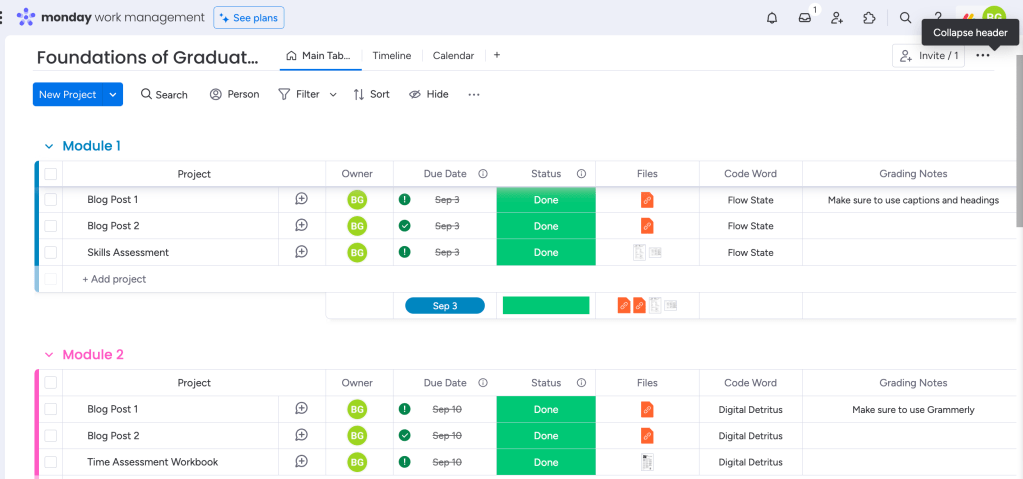
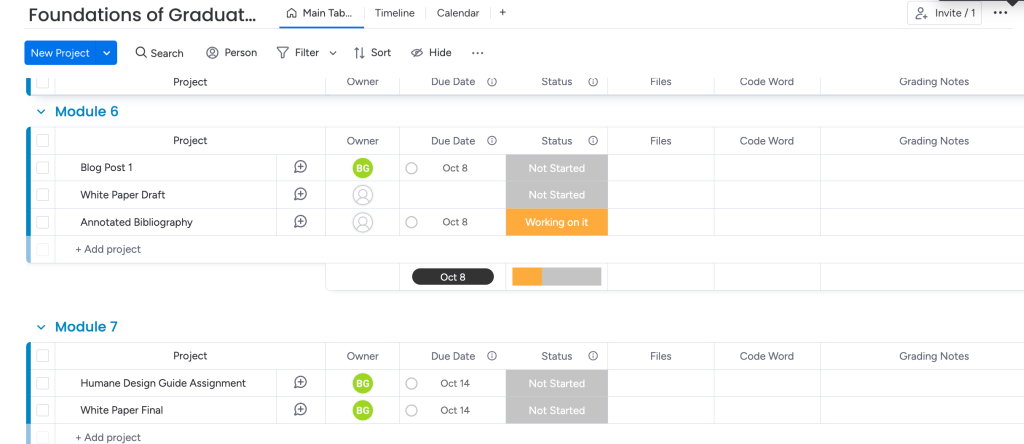
Some examples of using Monday.com to keep track of assignments and projects are below. I used the Foundations of Graduate Studies class syllabus and divided it into weekly modules. I added in the due dates, status, assignments or links to assignments, and grading notes that I can apply to future assignments. The two screenshots below are examples of completed assignments and also future assignments with their due dates clearly defined.
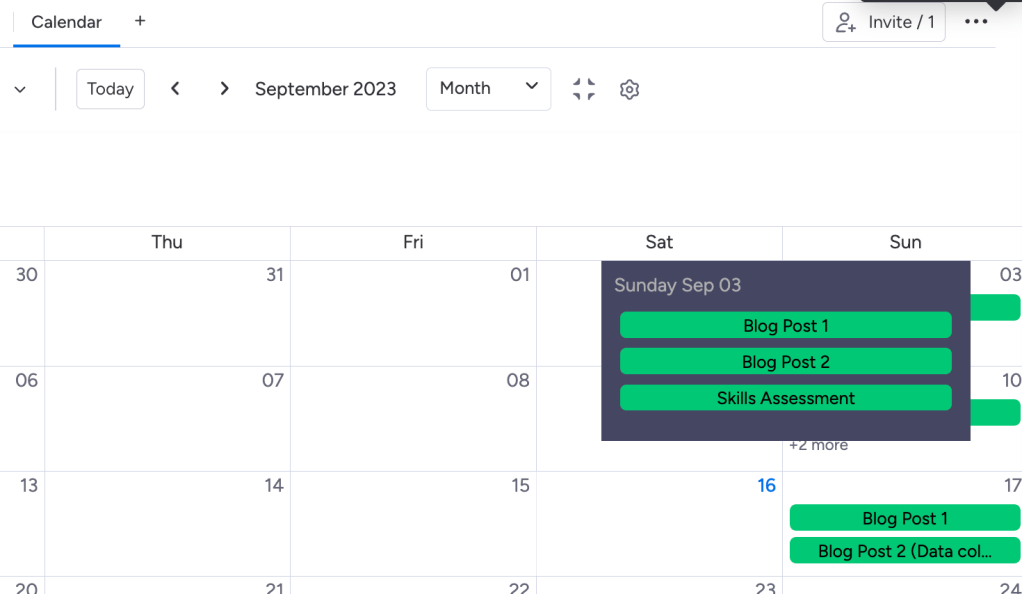
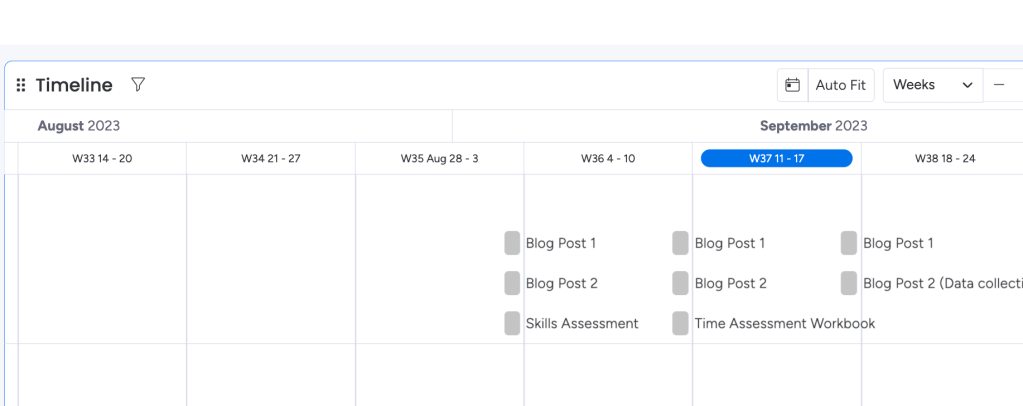
Another really helpful feature of Monday.com is the different views and filters available for boards with large amounts of data. For instance, if I look at “timeline” or “calendar” view, I can see all of my deadlines and assignments laid out over a period of time.
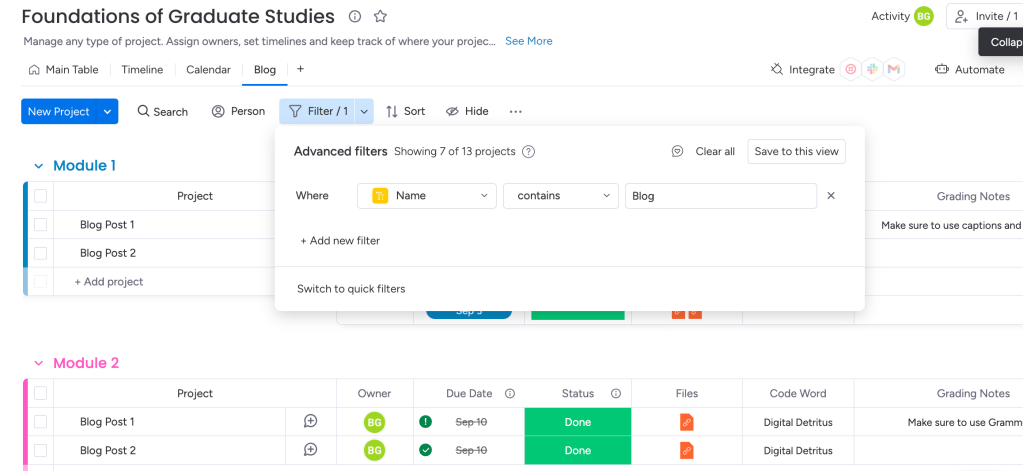
In addition, filters are also available to only view specific information if there is an overwhelming amount of data on the board. For instance, if I only wanted to see specific assignments such as blogs in one place, I could create a specific filter as shown in the screenshot below. This can also be very helpful on boards with large amounts of data to create personalized views for each employee or team to filter out superfluous information.
In conclusion, Monday.com is only one of many project management platforms on the market right now. Although it is one of the higher-priced programs, I would argue that most of the features are easy to use and anyone can learn it fairly quickly. Although it has some flaws, I have communicated with their excellent customer service in the past and found that they are a rapidly growing company that is constantly growing and making valuable improvements every day. Monday.com does in fact make my Monday’s happy.
Citation:
Duffy, J., & Sevilla, G. (2020, December 30). Monday.com Review. PCMAG. https://www.pcmag.com/reviews/mondaycom
 Becca Gottlieb Creative
Leave a comment